Foram encontradas 60 questões.
Disciplina: Atualidades e Conhecimentos Gerais
Banca: VUNESP
Orgão: CREFITO-3
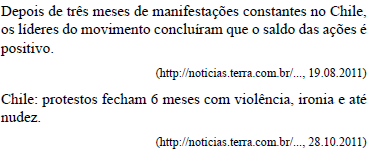
Esses protestos reivindicam
Provas

Em uma perfumaria, o preço de tabela de um frasco do perfume Y é o triplo do preço de tabela de um frasco da loção Z. Comprando um “pacote promocional” contendo dois frascos dessa loção e um frasco desse perfume, o consumidor obtém um desconto de 20% sobre o preço de tabela de cada item, pagando um total de R$ 250,00. Conclui-se, então, que o preço de tabela de um frasco do perfume Y é
Provas
Três amigos fazem caminhadas diárias. Eles largam juntos em uma pista, percorrendo-a com velocidade constante. Pedro completa cada volta em 9 minutos, João em 12 minutos e Paulo em 15 minutos. Desse modo, é correto afirmar que, após a largada, Pedro estará exatamente uma volta à frente de Paulo e de João, respectivamente, em
Provas
Laura arrumou todos os seus livros, distribuindo-os em 3 prateleiras de uma estante. Sabe-se que na prateleira superior foram colocados 2/5 da quantidade total de livros, que o número de livros colocados na prateleira do meio corresponde a 3/4 da quantidade colocada na prateleira superior, e que a prateleira inferior ficou com 9 livros. Se a quantidade total tivesse sido repartida igualmente entre as três prateleiras, cada uma delas teria ficado com um número de livros igual a
Provas
Observe as informações contidas no quadro.
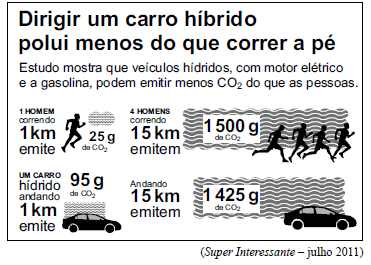
De acordo com os dados apresentados, é correto afirmar que a quantidade, em gramas, de CO2 emitida por 2 carros híbridos andando 8 km equivale à quantidade, em gramas, de CO2 emitida por 16 homens correndo uma distância, em metros, igual a
Provas
O texto a seguir, extraído e adaptado do Help do sistema operacional Windows 7, deve ser utilizado para responder às questões de números 58 a 60.Select multiple files or folders There are several ways to select multiple files or folders.
• (1) To select a consecutive group of files or folders, click the first item, press and hold down the Shift key, and then click the last item.
• (2) To select multiple files or folders that are near each other, drag the mouse pointer to create a selection around the outside of all the items that you want to include.
• (3) To select non-consecutive files or folders, press and hold down the Ctrl key, and then click each item that you want to select.
• (4) To select all of the files or folders in a window, on the toolbar, click Organize, and then click Select all. If you want to exclude one or more items from your selection, press and hold down the Ctrl key, and then click the items.
• (5) To select multiple files or folders by using check boxes: (a)
→ Click to open Folder Options. (b) Click the View tab. (c) Select the Use check boxes to select items check box, and then click OK. To clear a selection, click a blank area of the window. Tip: After selecting files or folders, you can perform many common tasks, such as copying, deleting, renaming, printing, and compressing. Simply right-click the selected items, and then click the appropriate choice.
No texto, a expressão press and hold down tem o significado de:
Provas
O texto a seguir, extraído e adaptado do Help do sistema operacional Windows 7, deve ser utilizado para responder às questões de números 58 a 60.Select multiple files or folders There are several ways to select multiple files or folders.
• (1) To select a consecutive group of files or folders, click the first item, press and hold down the Shift key, and then click the last item.
• (2) To select multiple files or folders that are near each other, drag the mouse pointer to create a selection around the outside of all the items that you want to include.
• (3) To select non-consecutive files or folders, press and hold down the Ctrl key, and then click each item that you want to select.
• (4) To select all of the files or folders in a window, on the toolbar, click Organize, and then click Select all. If you want to exclude one or more items from your selection, press and hold down the Ctrl key, and then click the items.
• (5) To select multiple files or folders by using check boxes: (a)
→ Click to open Folder Options. (b) Click the View tab. (c) Select the Use check boxes to select items check box, and then click OK. To clear a selection, click a blank area of the window. Tip: After selecting files or folders, you can perform many common tasks, such as copying, deleting, renaming, printing, and compressing. Simply right-click the selected items, and then click the appropriate choice.
No texto, uma palavra que tem o significado de “escolha” é:
Provas
O texto a seguir, extraído e adaptado do Help do sistema operacional Windows 7, deve ser utilizado para responder às questões de números 58 a 60.Select multiple files or folders There are several ways to select multiple files or folders.
• (1) To select a consecutive group of files or folders, click the first item, press and hold down the Shift key, and then click the last item.
• (2) To select multiple files or folders that are near each other, drag the mouse pointer to create a selection around the outside of all the items that you want to include.
• (3) To select non-consecutive files or folders, press and hold down the Ctrl key, and then click each item that you want to select.
• (4) To select all of the files or folders in a window, on the toolbar, click Organize, and then click Select all. If you want to exclude one or more items from your selection, press and hold down the Ctrl key, and then click the items.
• (5) To select multiple files or folders by using check boxes: (a)
→ Click to open Folder Options. (b) Click the View tab. (c) Select the Use check boxes to select items check box, and then click OK. To clear a selection, click a blank area of the window. Tip: After selecting files or folders, you can perform many common tasks, such as copying, deleting, renaming, printing, and compressing. Simply right-click the selected items, and then click the appropriate choice.
Com base no texto, dentre as operações mencionadas que podem ser realizadas com base nos arquivos ou pastas selecionadas, encontram-se:
Provas
Para criar uma nova instância de um clipe, utilizando Actionscript 3.0, deve-se utilizar o construtor
Provas
No ActionScript 2.0, o comando trace() tem a função de
Provas
Caderno Container