Foram encontradas 60 questões.
Leia o texto II e responda às questões de 18 a 20.
TEXTO II
AMBIENT SOUND TO PLANT FINDER APPS: WHAT HIDDEN FEATURES
DOES MY PHONE HAVE?
Jennifer Jolly Special to USA TODAY. Published 5:35p.m. ET Jan. 24,2023 | Updated 12:25 p.m. ET Jan. 26, 2023
Smartphones are the obvious must-have tech gadget in 2023. More than 85% of us have one. We use it for several hours a day for just about everything from texting, talking, and taking photos or videos — to shopping, working, social media-ing, and so much more.
Still, are we getting the most out of our magical little do-everything devices? Probably not.
Gadget-makers add handy new tricks all the time. For instance, did you know that many smartphones now come with a built-in white noise machine? I didn’t, until I happened upon the feature buried in my accessibility settings a few days ago.
Take a look at that little bit of genius, plus a handful of other fun and useful tips to help you save time, money, and sanity. [...]
How can I use my phone to identify a plant?
Use your camera or photos to identify plants, landmarks, wine, and more.
Just last year, I paid a pretty penny to identify plants in my own backyard with a special app. Now, my phone does it for free.
For iPhones, this feature’s called Visual Look Up. For Androids, you can keep using Google Lens.
On an iPhone: Go to your Camera app, snap the photo, then look for the small "i" icon at the bottom, in the middle of a circle. As long as it has two small stars at its top-left corner, you’re in luck. Visual Look Up information is available for that photo.
You can also go back through your Photo app and find this on an older photo. You're good to go as long as the small “i” icon with the two stars is there.
Swipe up on the photo or tap that icon to see more of what the AI “sees” in the photo.
Either tap Look Up in the middle of your screen or tap that little “pin” icon to see what Siri can figure out about it.
Usually, it takes you to a Wikipedia page and shows other similar photos.
On most Androids: I usually use Google Lens for this as well. Bixby Vision is easy for Samsung devices too — and it’s all super similar to how it works for iPhones.
Open the Google Lens Camera app, tap the shutter button, and it automatically searches.
If you’re looking through a photo or video you already took — tap that photo and tap the little eye icon for Bixby Vision.
Adaptado de: https://www.usatoday.com/story/tech/2023/01/24/hidden-smartphone-features-iphone-android/11113779002/ Acesso em 26.01.2023
Sobre o texto II, pode-se afirmar que o autor
Provas

Leia o texto II e responda às questões de 18 a 20.
TEXTO II
AMBIENT SOUND TO PLANT FINDER APPS: WHAT HIDDEN FEATURES
DOES MY PHONE HAVE?
Jennifer Jolly Special to USA TODAY. Published 5:35p.m. ET Jan. 24,2023 | Updated 12:25 p.m. ET Jan. 26, 2023
Smartphones are the obvious must-have tech gadget in 2023. More than 85% of us have one. We use it for several hours a day for just about everything from texting, talking, and taking photos or videos — to shopping, working, social media-ing, and so much more.
Still, are we getting the most out of our magical little do-everything devices? Probably not.
Gadget-makers add handy new tricks all the time. For instance, did you know that many smartphones now come with a built-in white noise machine? I didn’t, until I happened upon the feature buried in my accessibility settings a few days ago.
Take a look at that little bit of genius, plus a handful of other fun and useful tips to help you save time, money, and sanity. [...]
How can I use my phone to identify a plant?
Use your camera or photos to identify plants, landmarks, wine, and more.
Just last year, I paid a pretty penny to identify plants in my own backyard with a special app. Now, my phone does it for free.
For iPhones, this feature’s called Visual Look Up. For Androids, you can keep using Google Lens.
On an iPhone: Go to your Camera app, snap the photo, then look for the small "i" icon at the bottom, in the middle of a circle. As long as it has two small stars at its top-left corner, you’re in luck. Visual Look Up information is available for that photo.
You can also go back through your Photo app and find this on an older photo. You're good to go as long as the small “i” icon with the two stars is there.
Swipe up on the photo or tap that icon to see more of what the AI “sees” in the photo.
Either tap Look Up in the middle of your screen or tap that little “pin” icon to see what Siri can figure out about it.
Usually, it takes you to a Wikipedia page and shows other similar photos.
On most Androids: I usually use Google Lens for this as well. Bixby Vision is easy for Samsung devices too — and it’s all super similar to how it works for iPhones.
Open the Google Lens Camera app, tap the shutter button, and it automatically searches.
If you’re looking through a photo or video you already took — tap that photo and tap the little eye icon for Bixby Vision.
Adaptado de: https://www.usatoday.com/story/tech/2023/01/24/hidden-smartphone-features-iphone-android/11113779002/ Acesso em 26.01.2023
No trecho “On an iPhone: Go to your Camera app, snap the photo, then look for the small "i" icon at the bottom, in the middle of a circle. As long as it has two small stars at its top-left corner, you’re in luck. Visual Look Up information is available for that photo.”, pode-se afirmar que o fragmento acima é instrucional por causa do uso dos verbos no
Provas
Leia o texto II e responda às questões de 18 a 20.
TEXTO II
AMBIENT SOUND TO PLANT FINDER APPS: WHAT HIDDEN FEATURES
DOES MY PHONE HAVE?
Jennifer Jolly Special to USA TODAY. Published 5:35p.m. ET Jan. 24,2023 | Updated 12:25 p.m. ET Jan. 26, 2023
Smartphones are the obvious must-have tech gadget in 2023. More than 85% of us have one. We use it for several hours a day for just about everything from texting, talking, and taking photos or videos — to shopping, working, social media-ing, and so much more.
Still, are we getting the most out of our magical little do-everything devices? Probably not.
Gadget-makers add handy new tricks all the time. For instance, did you know that many smartphones now come with a built-in white noise machine? I didn’t, until I happened upon the feature buried in my accessibility settings a few days ago.
Take a look at that little bit of genius, plus a handful of other fun and useful tips to help you save time, money, and sanity. [...]
How can I use my phone to identify a plant?
Use your camera or photos to identify plants, landmarks, wine, and more.
Just last year, I paid a pretty penny to identify plants in my own backyard with a special app. Now, my phone does it for free.
For iPhones, this feature’s called Visual Look Up. For Androids, you can keep using Google Lens.
On an iPhone: Go to your Camera app, snap the photo, then look for the small "i" icon at the bottom, in the middle of a circle. As long as it has two small stars at its top-left corner, you’re in luck. Visual Look Up information is available for that photo.
You can also go back through your Photo app and find this on an older photo. You're good to go as long as the small “i” icon with the two stars is there.
Swipe up on the photo or tap that icon to see more of what the AI “sees” in the photo.
Either tap Look Up in the middle of your screen or tap that little “pin” icon to see what Siri can figure out about it.
Usually, it takes you to a Wikipedia page and shows other similar photos.
On most Androids: I usually use Google Lens for this as well. Bixby Vision is easy for Samsung devices too — and it’s all super similar to how it works for iPhones.
Open the Google Lens Camera app, tap the shutter button, and it automatically searches.
If you’re looking through a photo or video you already took — tap that photo and tap the little eye icon for Bixby Vision.
Adaptado de: https://www.usatoday.com/story/tech/2023/01/24/hidden-smartphone-features-iphone-android/11113779002/ Acesso em 26.01.2023
Na sentença: “Now, my phone does it for free.”, o pronome “it” se refere à palavra
Provas
Leia o texto I e responda às questões 16 e 17.
TEXTO I
REAL ESTATE AGENTS SAY THEY CAN’T IMAGINE WORKING
WITHOUT CHATGPT NOW
By Samantha Murphy Kelly, CNN Business - Updated 1:47 PM EST, Sat January 28, 2023
If you came across a four bedroom, 3.5 bathroom home listed for sale recently on a quiet cul-de-sac in Cedar Rapids, Iowa, you might not think twice about the online listing. It included typical real estate descriptions like “ideal for entertaining” and “ample space for relaxation.”
But JJ Johannes, the realtor for the home, created the description in less than five seconds by typing a few keywords into ChatGPT, a viral new AI chatbot tool that can generate elaborate responses to user prompts. It’s a task, he said, that would otherwise have taken him an hour or more to write on his own.
“It saved me so much time,” Johannes told CNN, noting he made a few tweaks and edits to ChatGPT’s work before publishing it. “It’s not perfect but it was a great starting point. My background is in technology and writing something eloquent takes time. This made it so much easier.”
Johannes is among the real estate agents experimenting with ChatGPT since it was released publicly in late November. Some residential and commercial agents told CNN it has already changed the way they work, from writing listings and social media posts to drafting legal documents. It could also be used to automate repetitive tasks such as answering frequently asked questions and doing complex calculations. [...]
Adapted from: https://edition.cnn.com/2023/01/28/tech/chatgpt-real-estate. (Acesso em Jan 28, 2023)
Sobre o título do texto, é correto afirmar que os
Provas
Leia o texto I e responda às questões 16 e 17.
TEXTO I
REAL ESTATE AGENTS SAY THEY CAN’T IMAGINE WORKING
WITHOUT CHATGPT NOW
By Samantha Murphy Kelly, CNN Business - Updated 1:47 PM EST, Sat January 28, 2023
If you came across a four bedroom, 3.5 bathroom home listed for sale recently on a quiet cul-de-sac in Cedar Rapids, Iowa, you might not think twice about the online listing. It included typical real estate descriptions like “ideal for entertaining” and “ample space for relaxation.”
But JJ Johannes, the realtor for the home, created the description in less than five seconds by typing a few keywords into ChatGPT, a viral new AI chatbot tool that can generate elaborate responses to user prompts. It’s a task, he said, that would otherwise have taken him an hour or more to write on his own.
“It saved me so much time,” Johannes told CNN, noting he made a few tweaks and edits to ChatGPT’s work before publishing it. “It’s not perfect but it was a great starting point. My background is in technology and writing something eloquent takes time. This made it so much easier.”
Johannes is among the real estate agents experimenting with ChatGPT since it was released publicly in late November. Some residential and commercial agents told CNN it has already changed the way they work, from writing listings and social media posts to drafting legal documents. It could also be used to automate repetitive tasks such as answering frequently asked questions and doing complex calculations. [...]
Adapted from: https://edition.cnn.com/2023/01/28/tech/chatgpt-real-estate. (Acesso em Jan 28, 2023)
De acordo com o texto, é possível afirmar que o ChatGPT é uma ferramenta que gera
Provas
- SintaxeTermos Integrantes da OraçãoComplementos VerbaisObjeto Indireto
- SintaxeTermos Integrantes da OraçãoComplemento Nominal
- SintaxeTermos Acessórios e IndependentesTermos AcessóriosAdjunto Adnominal
- MorfologiaPronomesPronomes Indefinidos
- MorfologiaPronomesPronomes PessoaisPronomes Pessoais Oblíquos
Leia o texto I e responda às questões de 1 a 12.
TEXTO I
UTILIDADES DEMAIS
Flanando outro dia pela avenida Rio Branco, vi-me sem querer numa galeria formada por camelôs na cidade do Rio de Janeiro. E, como estava ali, caí na tentação de procurar um objeto: uma lanterninha, daquelas micro, de plástico, a pilha. O camelô me mostrou uma pequena peça, que acoplou a seu celular, e produziu um jatinho de luz. Agradeci e respondi que não me servia – “Não uso celular”, expliquei.
O camelô se escandalizou: “Não usa celular???”, perguntou, com vários pontos de interrogação e num volume que o fez ser ouvido por todo mundo em volta. A frase se espalhou pelos demais camelôs e, em segundos, à medida que eu passava pelo corredor humano, podia sentir os dedos apontados para mim e a frase: “Não usa celular!!!”. Para eles, eu devia equivaler a alguém que ainda não tinha aderido ao banho quente ou à luz elétrica. Acho até que um camelô me fotografou, talvez para mostrar a algum amigo incrédulo – como pode haver, em 2017, quem não use celular?
Consciente de ser um anacronismo ambulante, confesso-me esta pessoa e me atrevo a dizer que o celular nunca me fez falta – e continua não fazendo. Para me comunicar, vivo hoje mais ou menos como em 1990, quando o treco ainda não existia e nem se pensava no assunto.
Ninguém deixa de falar comigo por falta de telefone. Se estou em casa, atendo àquele aparelho que hoje chamam, com desprezo, de “fixo”. Se tiver de sair, faço as ligações de que preciso e vou alegremente para a rua. Se eu estiver fora e alguém me telefonar, paciência – se for importante, ligará de novo.
Por que não uso celular? Porque, com suas 1001 utilidades, tipo Bombril, ele é capaz de me escravizar. O único jeito é manter-me à distância – até o dia em que, com ou sem ele, provavelmente ficarei inviável de vez.
CASTRO, Ruy. Folha de São Paulo. Disponível em http://www1.folha.uol.com.br/ colunas/ruycastro/2017/07/1905766-utilidades-demais.shtml. Acesso em 03/01/2022. Adaptado.
Em “O camelô ME mostrou uma pequena peça” (1°§), o termo em destaque classificase morfossintaticamente como:
Provas
TEXTO I
UTILIDADES DEMAIS
Flanando outro dia pela avenida Rio Branco, vi-me sem querer numa galeria formada por camelôs na cidade do Rio de Janeiro. E, como estava ali, caí na tentação de procurar um objeto: uma lanterninha, daquelas micro, de plástico, a pilha. O camelô me mostrou uma pequena peça, que acoplou a seu celular, e produziu um jatinho de luz. Agradeci e respondi que não me servia – “Não uso celular”, expliquei.
O camelô se escandalizou: “Não usa celular???”, perguntou, com vários pontos de interrogação e num volume que o fez ser ouvido por todo mundo em volta. A frase se espalhou pelos demais camelôs e, em segundos, à medida que eu passava pelo corredor humano, podia sentir os dedos apontados para mim e a frase: “Não usa celular!!!”. Para eles, eu devia equivaler a alguém que ainda não tinha aderido ao banho quente ou à luz elétrica. Acho até que um camelô me fotografou, talvez para mostrar a algum amigo incrédulo – como pode haver, em 2017, quem não use celular?
Consciente de ser um anacronismo ambulante, confesso-me esta pessoa e me atrevo a dizer que o celular nunca me fez falta – e continua não fazendo. Para me comunicar, vivo hoje mais ou menos como em 1990, quando o treco ainda não existia e nem se pensava no assunto.
Ninguém deixa de falar comigo por falta de telefone. Se estou em casa, atendo àquele aparelho que hoje chamam, com desprezo, de “fixo”. Se tiver de sair, faço as ligações de que preciso e vou alegremente para a rua. Se eu estiver fora e alguém me telefonar, paciência – se for importante, ligará de novo.
Por que não uso celular? Porque, com suas 1001 utilidades, tipo Bombril, ele é capaz de me escravizar. O único jeito é manter-me à distância – até o dia em que, com ou sem ele, provavelmente ficarei inviável de vez.
CASTRO, Ruy. Folha de São Paulo. Disponível em http://www1.folha.uol.com.br/ colunas/ruycastro/2017/07/1905766-utilidades-demais.shtml. Acesso em 03/01/2022. Adaptado.
TEXTO II
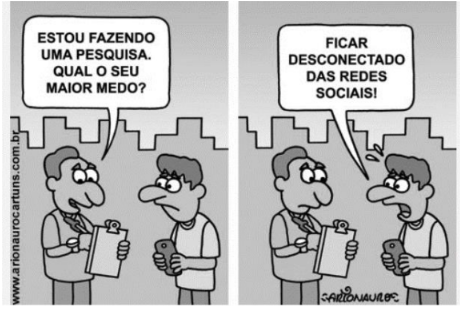
Disponível em http://www.arionaurocartuns.com.br/2019/05/. Acesso em 03/01/2022.
Com base nos textos I e II, assinale a alternativa correta.
Provas
- MorfologiaVerbosConjugaçãoFlexão Verbal de ModoIndicativo
- MorfologiaVerbosConjugaçãoFlexão Verbal de ModoSubjuntivo
- MorfologiaVerbosFormas NominaisInfinitivo
- MorfologiaVerbosFormas NominaisGerúndio
- MorfologiaVerbosFormas NominaisParticípio
Leia o texto II e responda às questões de 13 a 15.
TEXTO II
Disponível em http://www.arionaurocartuns.com.br/2019/05/. Acesso em 03/01/2022.
Em “Estou FAZENDO uma pesquisa”, a forma nominal do verbo em destaque é
Provas
- Interpretação de TextosInferência Textual
- Interpretação de TextosPressupostos e Subentendidos
- Interpretação de TextosNíveis de LinguagemLinguagem Formal
- Interpretação de TextosTipologia e Gênero TextualTipologias TextuaisTexto Narrativo
- Interpretação de TextosTipologia e Gênero TextualTipologias TextuaisTexto Descritivo
- Interpretação de TextosVariação da LinguagemLinguagem Verbal e Não Verbal
Leia o texto II e responda às questões de 13 a 15.
TEXTO II
Disponível em http://www.arionaurocartuns.com.br/2019/05/. Acesso em 03/01/2022.
A tirinha acima exemplifica a linguagem mista, pois
Provas
- OrtografiaConvenções da Escrita
- OrtografiaPontuaçãoAspas
- MorfologiaEstrutura das Palavras
- Interpretação de TextosFunções da LinguagemFunção Metalinguística
Leia o texto I e responda às questões de 1 a 12.
TEXTO I
UTILIDADES DEMAIS
Flanando outro dia pela avenida Rio Branco, vi-me sem querer numa galeria formada por camelôs na cidade do Rio de Janeiro. E, como estava ali, caí na tentação de procurar um objeto: uma lanterninha, daquelas micro, de plástico, a pilha. O camelô me mostrou uma pequena peça, que acoplou a seu celular, e produziu um jatinho de luz. Agradeci e respondi que não me servia – “Não uso celular”, expliquei.
O camelô se escandalizou: “Não usa celular???”, perguntou, com vários pontos de interrogação e num volume que o fez ser ouvido por todo mundo em volta. A frase se espalhou pelos demais camelôs e, em segundos, à medida que eu passava pelo corredor humano, podia sentir os dedos apontados para mim e a frase: “Não usa celular!!!”. Para eles, eu devia equivaler a alguém que ainda não tinha aderido ao banho quente ou à luz elétrica. Acho até que um camelô me fotografou, talvez para mostrar a algum amigo incrédulo – como pode haver, em 2017, quem não use celular?
Consciente de ser um anacronismo ambulante, confesso-me esta pessoa e me atrevo a dizer que o celular nunca me fez falta – e continua não fazendo. Para me comunicar, vivo hoje mais ou menos como em 1990, quando o treco ainda não existia e nem se pensava no assunto.
Ninguém deixa de falar comigo por falta de telefone. Se estou em casa, atendo àquele aparelho que hoje chamam, com desprezo, de “fixo”. Se tiver de sair, faço as ligações de que preciso e vou alegremente para a rua. Se eu estiver fora e alguém me telefonar, paciência – se for importante, ligará de novo.
Por que não uso celular? Porque, com suas 1001 utilidades, tipo Bombril, ele é capaz de me escravizar. O único jeito é manter-me à distância – até o dia em que, com ou sem ele, provavelmente ficarei inviável de vez.
CASTRO, Ruy. Folha de São Paulo. Disponível em http://www1.folha.uol.com.br/ colunas/ruycastro/2017/07/1905766-utilidades-demais.shtml. Acesso em 03/01/2022. Adaptado.
No quarto parágrafo, considerando o contexto do texto, a palavra FIXO está entre aspas, por se tratar de
Provas
Caderno Container