Foram encontradas 50 questões.
SECRETARIA DE FINANÇAS DO RECIFE Empresa Municipal de Informática - EMPREL
Histórico
A rede de história da EMPREL começou a ser tecida em 1963, quando a Prefeitura do Recife adquiriu seu primeiro computador, um modelo IBM 1401, para a antiga Divisão de Mecanização.
Em 9 de dezembro de 1969, uma lei municipal, finalmente institucionalizou a então Empresa Municipal de Processamento Eletrônico.
Em janeiro de 1970, no velho casarão 271 da rua da União, a EMPREL engatinhava no gerenciamento da arrecadação de tributos e na folha de pagamento do funcionalismo municipal.
Passados 26 anos da sua criação e hoje denominada de Empresa Municipal de Informática, a EMPREL dispõe de eficiente parque tecnológico, composto de redes de microcomputadores, Geoprocessamento, Multimídia e é provedor público de acesso à Internet.
Atuação
Rede de Cidadania para auxiliar o cidadão, uma rede de serviços foi desenvolvida, com pesquisas mensais de preços de produtos nos supermercados ou de produtos de época. Na educação, toda renovação de matrícula já é automática, e os alunos das escolas municipais aprendem informática.
Rede de Saúde
Desde o controle de campanhas de vacinação e epidemiológico até o gerenciamento dos postos de saúde comunitários, uma rede de sistemas cuida bem da saúde do Recife. O Projeto Cooperado de Saúde é outra atividade que vai ajudar a saúde pública de todo o país.
Rede Urbanística
Transportes urbanos, na manutenção e no acompanhamento das obras. Além, claro, de todo planejamento.
Rede de Gerenciamento
A arrecadação e a aplicação dos impostos também contam com eficiente rede de sistemas. Inclusive com autoatendimento.
Disponível em: www.recife.pe.gov.br/pr/sec.finanças/emprel.historico. Acesso em: 16.04.2012.
Observe os itens abaixo:
I. “A rede de história da EMPREL começou a ser tecida em 1963...”
II. “Em janeiro de 1970, no velho casarão 271 da rua da União...”
III. “Passados 26 anos da sua criação...”
IV. “Na educação, toda renovação de matrícula já é automática...”
V. “Desde o controle de campanhas de vacinação e epidemiológico...”
Sobre eles, está CORRETO o que se declara na alternativa
Provas
Questão presente nas seguintes provas

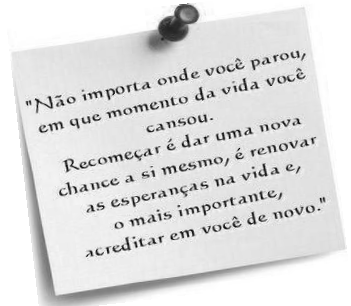
Disponível em: www.recantodasluzes.com.br. Acesso em: 14.04.2012.
Segundo o autor, para recomeçar
Provas
Questão presente nas seguintes provas
1297899
Ano: 2012
Disciplina: TI - Desenvolvimento de Sistemas
Banca: UPENET/IAUPE
Orgão: EMPREL
Disciplina: TI - Desenvolvimento de Sistemas
Banca: UPENET/IAUPE
Orgão: EMPREL
Provas:
A UML oferece alguns mecanismos para a extensão da sua sintaxe e semântica. Sobre isso, correlacione as colunas.
I. Conceber novos atributos de modelagem.
II. Conceber novos elementos de modelagem.
III. Conceber uma nova semântica de modelagem.
( ) Valores atribuídos
( ) Estereótipos
( ) Restrições
Assinale a alternativa que contém a sequência CORRETA.
Provas
Questão presente nas seguintes provas
SECRETARIA DE FINANÇAS DO RECIFE Empresa Municipal de Informática - EMPREL
Histórico
A rede de história da EMPREL começou a ser tecida em 1963, quando a Prefeitura do Recife adquiriu seu primeiro computador, um modelo IBM 1401, para a antiga Divisão de Mecanização.
Em 9 de dezembro de 1969, uma lei municipal, finalmente institucionalizou a então Empresa Municipal de Processamento Eletrônico.
Em janeiro de 1970, no velho casarão 271 da rua da União, a EMPREL engatinhava no gerenciamento da arrecadação de tributos e na folha de pagamento do funcionalismo municipal.
Passados 26 anos da sua criação e hoje denominada de Empresa Municipal de Informática, a EMPREL dispõe de eficiente parque tecnológico, composto de redes de microcomputadores, Geoprocessamento, Multimídia e é provedor público de acesso à Internet.
Atuação
Rede de Cidadania para auxiliar o cidadão, uma rede de serviços foi desenvolvida, com pesquisas mensais de preços de produtos nos supermercados ou de produtos de época. Na educação, toda renovação de matrícula já é automática, e os alunos das escolas municipais aprendem informática.
Rede de Saúde
Desde o controle de campanhas de vacinação e epidemiológico até o gerenciamento dos postos de saúde comunitários, uma rede de sistemas cuida bem da saúde do Recife. O Projeto Cooperado de Saúde é outra atividade que vai ajudar a saúde pública de todo o país.
Rede Urbanística
Transportes urbanos, na manutenção e no acompanhamento das obras. Além, claro, de todo planejamento.
Rede de Gerenciamento
A arrecadação e a aplicação dos impostos também contam com eficiente rede de sistemas. Inclusive com autoatendimento.
Disponível em: www.recife.pe.gov.br/pr/sec.finanças/emprel.historico. Acesso em: 16.04.2012.
Extraíram-se do texto 05 alguns fragmentos, e, em um deles, passou a existir um ERRO de Ortografia que se encontra na alternativa
Provas
Questão presente nas seguintes provas
- Read the text below and answer the questions.
The Five Generations of Computers
Each generation of computer is characterized by a major technological development that fundamentally changed the way computers operate, resulting in increasingly smaller, cheaper, more powerful and more efficient and reliable devices.
The history of computer development is often referred to in reference to the different generations of computing devices. Each generation of computer is characterized by a major technological development that fundamentally changed the way computers operate, resulting in increasingly smaller, cheaper, more powerful and more efficient and reliable devices. Read about each generation and the developments that led to the current devices that we use today.
First Generation (1940-1956) Vacuum Tubes
The first computers used vacuum tubes for circuitry and magnetic drums for memory, and were often enormous, taking up entire rooms. They were very expensive to operate and in addition to using a great deal of electricity, generated a lot of heat, which was often the cause of malfunctions.
First generation computers relied on machine language, the lowest-level programming language understood by computers, to perform operations, and they could only solve one problem at a time. Input was based on punched cards and paper tape, and output was displayed on printouts.
The UNIVAC and ENIAC computers are examples of first-generation computing devices. The UNIVAC was the first commercial computer delivered to a business client, the U.S. Census Bureau in 1951.
Second Generation (1956-1963) Transistors
Transistors replaced vacuum tubes and ushered in the second generation of computers. The transistor was invented in 1947 but did not see widespread use in computers until the late 1950s. The transistor was far superior to the vacuum tube, allowing computers to become smaller, faster, cheaper, more energy-efficient and more reliable than their firstgeneration predecessors. Though the transistor still generated a great deal of heat that subjected the computer to damage, it was a vast improvement over the vacuum tube. Second-generation computers still relied on punched cards for input and printouts for output.
Second-generation computers moved from cryptic binary machine language to symbolic, or assembly, languages, which allowed programmers to specify instructions in words. High-level programming languages were also being developed at this time, such as early versions of COBOL and FORTRAN. These were also the first computers that stored their instructions in their memory, which moved from a magnetic drum to magnetic core technology.The first computers of this generation were developed for the atomic energy industry.
Third Generation (1964-1971) Integrated Circuits
The development of the integrated circuit was the hallmark of the third generation of computers. Transistors were miniaturized and placed on silicon chips, called semiconductors, which drastically increased the speed and efficiency of computers.
Instead of punched cards and printouts, users interacted with third generation computers through keyboards and monitors and interfaced with an operating system, which allowed the device to run many different applications at one time with a central program that monitored the memory. Computers for the first time became accessible to a mass audience because they were smaller and cheaper than their predecessors.
Fourth Generation (1971-Present) Microprocessors
The microprocessor brought the fourth generation of computers, as thousands of integrated circuits were built onto a single silicon chip. What in the first generation filled an entire room could now fit in the palm of the hand. The Intel 4004 chip, developed in 1971, located all the components of the computer—from the central processing unit and memory to input/output controls—on a single chip.
In 1981 IBM introduced its first computer for the home user, and in 1984 Apple introduced the Macintosh. Microprocessors also moved out of the realm of desktop computers and into many areas of life as more and more everyday products began to use microprocessors.
As these small computers became more powerful, they could be linked together to form networks, which eventually led to the development of the Internet. Fourth generation computers also saw the development of GUIs, the mouse and handheld devices.
Fifth Generation (Present and Beyond) Artificial Intelligence
Fifth generation computing devices, based on artificial intelligence, are still in development, though there are some applications, such as voice recognition, that are being used today. The use of parallel processing and superconductors is helping to make artificial intelligence a reality. Quantum computation and molecular and nanotechnology will radically change the face of computers in years to come. The goal of fifth-generation computing is to develop devices that respond to natural language input and are capable of learning and self-organization.
http://www.webopedia.com/DidYouKnow/Hardware_Software/2002/FiveGenerations.asp (consultado em 11/04/12)
How many problems could the computer of the first generation solve?
Provas
Questão presente nas seguintes provas
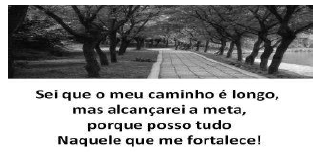
Disponível em: www.luzesdavida.com.br. Acesso em: 15.04.2012.
Se o sujeito do texto fosse permutado por NÓS, preservando-se os tempos verbais, o texto CORRETO estaria contido na alternativa
Provas
Questão presente nas seguintes provas
Enter password: ********
Welcome to the MySQL monitor. Commands end with ; or g.
Your MySQL connection id is 4
Server version: 5.5.17 MySQL Community Server (GPL)
Copyright c) 2000, 2011, Oracle and/or its affiliates. All rights reserved.
Oracle is a registered trademark of Oracle Corporation and/or its
affiliates. Other names may be trademarks of their respective owners.
Type 'help;' or 'h' for help. Type 'c' to clear the current input statement.
mysql> CREATE DATABASE EMPREL;
Query OK, 1 row affected (0.01 sec)
mysql> USE EMPREL;
Database changed
mysql> CREATE TABLE Empregado (
-> Matricula char(5) PRIMARY KEY,
-> Nome varchar(30),
-> numDepto int
-> );
Query OK, 0 rows affected (0.06 sec)
Welcome to the MySQL monitor. Commands end with ; or g.
Your MySQL connection id is 4
Server version: 5.5.17 MySQL Community Server (GPL)
Copyright c) 2000, 2011, Oracle and/or its affiliates. All rights reserved.
Oracle is a registered trademark of Oracle Corporation and/or its
affiliates. Other names may be trademarks of their respective owners.
Type 'help;' or 'h' for help. Type 'c' to clear the current input statement.
mysql> CREATE DATABASE EMPREL;
Query OK, 1 row affected (0.01 sec)
mysql> USE EMPREL;
Database changed
mysql> CREATE TABLE Empregado (
-> Matricula char(5) PRIMARY KEY,
-> Nome varchar(30),
-> numDepto int
-> );
Query OK, 0 rows affected (0.06 sec)
mysql> CREATE TABLE Departamento (
-> numDepto int UNIQUE,
-> nomeDepto varchar(30)
-> );
Query OK, 0 rows affected (0.06 sec)
mysql> ALTER TABLE Empregado ADD CONSTRAINT fk_empregado_depto
-> FOREIGN KEY (numDepto) REFERENCES Departamento(numDepto);
Query OK, 0 rows affected (0.13 sec)
Records: 0 Duplicates: 0 Warnings: 0
mysql> INSERT INTO Departamento VALUES (1, 'Vendas');
Query OK, 1 row affected (0.02 sec)
mysql> INSERT INTO Departamento VALUES (2, 'Marketing');
Query OK, 1 row affected (0.02 sec)
mysql> INSERT INTO Departamento VALUES (3, 'Contabilidade');
Query OK, 1 row affected (0.03 sec)
mysql> INSERT INTO Departamento VALUES (4, 'RH');
Query OK, 1 row affected (0.01 sec)
mysql> INSERT INTO Empregado VALUES ('11111', 'Ana', 1);
Query OK, 1 row affected (0.01 sec)
mysql> INSERT INTO Empregado VALUES ('22222', 'Beth', 3);
Query OK, 1 row affected (0.02 sec)
mysql> INSERT INTO Empregado VALUES ('33333', 'Carla', 3);
Query OK, 1 row affected (0.01 sec)
mysql> INSERT INTO Empregado VALUES ('44444', 'Danny', 4);
Query OK, 1 row affected (0.00 sec)
mysql> INSERT INTO Empregado VALUES ('55555', 'Eliane', 4);
Query OK, 1 row affected (0.03 sec)
mysql> INSERT INTO Empregado VALUES ('66666', 'Fatima', NULL);
Query OK, 1 row affected (0.01 sec)
mysql> ALTER TABLE Departamento ADD TotalEmpregados int;
Query OK, 4 rows affected (0.14 sec)
Records: 4 Duplicates: 0 Warnings: 0
mysql> /* IMPORTANTE! Nesse ponto, entra um comando SQL que será cobrado na questão 26. */
mysql> Delimiter //
mysql> CREATE TRIGGER alteraDepto1
-> AFTER INSERT ON Empregado
-> FOR EACH ROW
-> BEGIN
-> IF (NEW.numDepto IS NOT NULL) THEN
-> UPDATE departamento
-> SET TotalEmpregados = TotalEmpregados + 1
-> WHERE departamento.numDepto = NEW.numDepto;
-> END IF;
-> END//
Query OK, 0 rows affected (0.00 sec)
mysql> Delimiter ;
mysql> INSERT INTO Empregado values ('77777', 'Gabriela', 3);
Query OK, 1 row affected (0.03 sec)
mysql> Delimiter //
mysql> CREATE TRIGGER alteraDepto2
-> AFTER DELETE ON Empregado
-> FOR EACH ROW
-> BEGIN
-> IF (OLD.numDepto IS NOT NULL) THEN
-> UPDATE Departamento
-> SET totalEmpregados = totalEmpregados - 1
-> WHERE Departamento.numDepto = OLD.numDepto;
-> END IF;
-> END//
Query OK, 0 rows affected (0.03 sec)
mysql> Delimiter ;
mysql> DELETE FROM Empregado WHERE Matricula = '77777';
Query OK, 1 row affected (0.03 sec)
-> numDepto int UNIQUE,
-> nomeDepto varchar(30)
-> );
Query OK, 0 rows affected (0.06 sec)
mysql> ALTER TABLE Empregado ADD CONSTRAINT fk_empregado_depto
-> FOREIGN KEY (numDepto) REFERENCES Departamento(numDepto);
Query OK, 0 rows affected (0.13 sec)
Records: 0 Duplicates: 0 Warnings: 0
mysql> INSERT INTO Departamento VALUES (1, 'Vendas');
Query OK, 1 row affected (0.02 sec)
mysql> INSERT INTO Departamento VALUES (2, 'Marketing');
Query OK, 1 row affected (0.02 sec)
mysql> INSERT INTO Departamento VALUES (3, 'Contabilidade');
Query OK, 1 row affected (0.03 sec)
mysql> INSERT INTO Departamento VALUES (4, 'RH');
Query OK, 1 row affected (0.01 sec)
mysql> INSERT INTO Empregado VALUES ('11111', 'Ana', 1);
Query OK, 1 row affected (0.01 sec)
mysql> INSERT INTO Empregado VALUES ('22222', 'Beth', 3);
Query OK, 1 row affected (0.02 sec)
mysql> INSERT INTO Empregado VALUES ('33333', 'Carla', 3);
Query OK, 1 row affected (0.01 sec)
mysql> INSERT INTO Empregado VALUES ('44444', 'Danny', 4);
Query OK, 1 row affected (0.00 sec)
mysql> INSERT INTO Empregado VALUES ('55555', 'Eliane', 4);
Query OK, 1 row affected (0.03 sec)
mysql> INSERT INTO Empregado VALUES ('66666', 'Fatima', NULL);
Query OK, 1 row affected (0.01 sec)
mysql> ALTER TABLE Departamento ADD TotalEmpregados int;
Query OK, 4 rows affected (0.14 sec)
Records: 4 Duplicates: 0 Warnings: 0
mysql> /* IMPORTANTE! Nesse ponto, entra um comando SQL que será cobrado na questão 26. */
mysql> Delimiter //
mysql> CREATE TRIGGER alteraDepto1
-> AFTER INSERT ON Empregado
-> FOR EACH ROW
-> BEGIN
-> IF (NEW.numDepto IS NOT NULL) THEN
-> UPDATE departamento
-> SET TotalEmpregados = TotalEmpregados + 1
-> WHERE departamento.numDepto = NEW.numDepto;
-> END IF;
-> END//
Query OK, 0 rows affected (0.00 sec)
mysql> Delimiter ;
mysql> INSERT INTO Empregado values ('77777', 'Gabriela', 3);
Query OK, 1 row affected (0.03 sec)
mysql> Delimiter //
mysql> CREATE TRIGGER alteraDepto2
-> AFTER DELETE ON Empregado
-> FOR EACH ROW
-> BEGIN
-> IF (OLD.numDepto IS NOT NULL) THEN
-> UPDATE Departamento
-> SET totalEmpregados = totalEmpregados - 1
-> WHERE Departamento.numDepto = OLD.numDepto;
-> END IF;
-> END//
Query OK, 0 rows affected (0.03 sec)
mysql> Delimiter ;
mysql> DELETE FROM Empregado WHERE Matricula = '77777';
Query OK, 1 row affected (0.03 sec)
Considere que a consulta a seguir foi executada sobre a base de dados, com o estado resultante da sequência dos comandos apresentados anteriormente.
SELECT E.Nome, D.nomeDepto
FROM Empregado AS E, Departamento AS D
WHERE E.numDepto >= 2 AND E.numDepto = D.numDepto AND NOT E.numDepto IS NULL ORDER BY E.Matricula;
FROM Empregado AS E, Departamento AS D
WHERE E.numDepto >= 2 AND E.numDepto = D.numDepto AND NOT E.numDepto IS NULL ORDER BY E.Matricula;
i. Lista a coluna nome da tabela Empregado;
ii. Só considera as tuplas que têm o atributo numDepto maior e igual a 2;
iii. Só considera os registros que apresentam o atributo numDepto não nulo;
iv. Apresenta o resultado em ordem alfabética.
v. Os nomes dos departamentos, coluna nomeDepto, surgirão na consulta, em ordem alfabética.
Assinale a alternativa que aponta a quantidade de assertiva(s) CORRETA(S).
Provas
Questão presente nas seguintes provas
- Read the text below and answer the questions.
The Five Generations of Computers
Each generation of computer is characterized by a major technological development that fundamentally changed the way computers operate, resulting in increasingly smaller, cheaper, more powerful and more efficient and reliable devices.
The history of computer development is often referred to in reference to the different generations of computing devices. Each generation of computer is characterized by a major technological development that fundamentally changed the way computers operate, resulting in increasingly smaller, cheaper, more powerful and more efficient and reliable devices. Read about each generation and the developments that led to the current devices that we use today.
First Generation (1940-1956) Vacuum Tubes
The first computers used vacuum tubes for circuitry and magnetic drums for memory, and were often enormous, taking up entire rooms. They were very expensive to operate and in addition to using a great deal of electricity, generated a lot of heat, which was often the cause of malfunctions.
First generation computers relied on machine language, the lowest-level programming language understood by computers, to perform operations, and they could only solve one problem at a time. Input was based on punched cards and paper tape, and output was displayed on printouts.
The UNIVAC and ENIAC computers are examples of first-generation computing devices. The UNIVAC was the first commercial computer delivered to a business client, the U.S. Census Bureau in 1951.
Second Generation (1956-1963) Transistors
Transistors replaced vacuum tubes and ushered in the second generation of computers. The transistor was invented in 1947 but did not see widespread use in computers until the late 1950s. The transistor was far superior to the vacuum tube, allowing computers to become smaller, faster, cheaper, more energy-efficient and more reliable than their firstgeneration predecessors. Though the transistor still generated a great deal of heat that subjected the computer to damage, it was a vast improvement over the vacuum tube. Second-generation computers still relied on punched cards for input and printouts for output.
Second-generation computers moved from cryptic binary machine language to symbolic, or assembly, languages, which allowed programmers to specify instructions in words. High-level programming languages were also being developed at this time, such as early versions of COBOL and FORTRAN. These were also the first computers that stored their instructions in their memory, which moved from a magnetic drum to magnetic core technology.The first computers of this generation were developed for the atomic energy industry.
Third Generation (1964-1971) Integrated Circuits
The development of the integrated circuit was the hallmark of the third generation of computers. Transistors were miniaturized and placed on silicon chips, called semiconductors, which drastically increased the speed and efficiency of computers.
Instead of punched cards and printouts, users interacted with third generation computers through keyboards and monitors and interfaced with an operating system, which allowed the device to run many different applications at one time with a central program that monitored the memory. Computers for the first time became accessible to a mass audience because they were smaller and cheaper than their predecessors.
Fourth Generation (1971-Present) Microprocessors
The microprocessor brought the fourth generation of computers, as thousands of integrated circuits were built onto a single silicon chip. What in the first generation filled an entire room could now fit in the palm of the hand. The Intel 4004 chip, developed in 1971, located all the components of the computer—from the central processing unit and memory to input/output controls—on a single chip.
In 1981 IBM introduced its first computer for the home user, and in 1984 Apple introduced the Macintosh. Microprocessors also moved out of the realm of desktop computers and into many areas of life as more and more everyday products began to use microprocessors.
As these small computers became more powerful, they could be linked together to form networks, which eventually led to the development of the Internet. Fourth generation computers also saw the development of GUIs, the mouse and handheld devices.
Fifth Generation (Present and Beyond) Artificial Intelligence
Fifth generation computing devices, based on artificial intelligence, are still in development, though there are some applications, such as voice recognition, that are being used today. The use of parallel processing and superconductors is helping to make artificial intelligence a reality. Quantum computation and molecular and nanotechnology will radically change the face of computers in years to come. The goal of fifth-generation computing is to develop devices that respond to natural language input and are capable of learning and self-organization.
http://www.webopedia.com/DidYouKnow/Hardware_Software/2002/FiveGenerations.asp (consultado em 11/04/12)
Why was the transistor important for this generation? Because it
Provas
Questão presente nas seguintes provas
1104467
Ano: 2012
Disciplina: TI - Desenvolvimento de Sistemas
Banca: UPENET/IAUPE
Orgão: EMPREL
Disciplina: TI - Desenvolvimento de Sistemas
Banca: UPENET/IAUPE
Orgão: EMPREL
Provas:
O OMG (Object Management Group) padronizou várias linguagens em modelos. Esses modelos são classificados em um determinado nível de abstração. O nível !$ M_3 !$, o mais abstrato, corresponde ao MOF (Meta Object Facility). O MOF é um padrão, que define uma linguagem abstrata e uma estrutura para a especificação, construção e gerência de metamodelos, de forma independente de tecnologia.
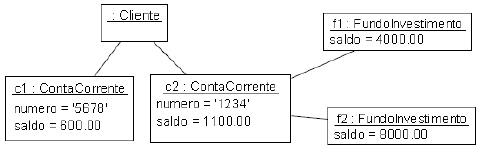
Sendo assim, é CORRETO afirmar que o modelo que segue encontra-se no nível
Provas
Questão presente nas seguintes provas
- Read the text below and answer the questions.
The Five Generations of Computers
Each generation of computer is characterized by a major technological development that fundamentally changed the way computers operate, resulting in increasingly smaller, cheaper, more powerful and more efficient and reliable devices.
The history of computer development is often referred to in reference to the different generations of computing devices. Each generation of computer is characterized by a major technological development that fundamentally changed the way computers operate, resulting in increasingly smaller, cheaper, more powerful and more efficient and reliable devices. Read about each generation and the developments that led to the current devices that we use today.
First Generation (1940-1956) Vacuum Tubes
The first computers used vacuum tubes for circuitry and magnetic drums for memory, and were often enormous, taking up entire rooms. They were very expensive to operate and in addition to using a great deal of electricity, generated a lot of heat, which was often the cause of malfunctions.
First generation computers relied on machine language, the lowest-level programming language understood by computers, to perform operations, and they could only solve one problem at a time. Input was based on punched cards and paper tape, and output was displayed on printouts.
The UNIVAC and ENIAC computers are examples of first-generation computing devices. The UNIVAC was the first commercial computer delivered to a business client, the U.S. Census Bureau in 1951.
Second Generation (1956-1963) Transistors
Transistors replaced vacuum tubes and ushered in the second generation of computers. The transistor was invented in 1947 but did not see widespread use in computers until the late 1950s. The transistor was far superior to the vacuum tube, allowing computers to become smaller, faster, cheaper, more energy-efficient and more reliable than their firstgeneration predecessors. Though the transistor still generated a great deal of heat that subjected the computer to damage, it was a vast improvement over the vacuum tube. Second-generation computers still relied on punched cards for input and printouts for output.
Second-generation computers moved from cryptic binary machine language to symbolic, or assembly, languages, which allowed programmers to specify instructions in words. High-level programming languages were also being developed at this time, such as early versions of COBOL and FORTRAN. These were also the first computers that stored their instructions in their memory, which moved from a magnetic drum to magnetic core technology.The first computers of this generation were developed for the atomic energy industry.
Third Generation (1964-1971) Integrated Circuits
The development of the integrated circuit was the hallmark of the third generation of computers. Transistors were miniaturized and placed on silicon chips, called semiconductors, which drastically increased the speed and efficiency of computers.
Instead of punched cards and printouts, users interacted with third generation computers through keyboards and monitors and interfaced with an operating system, which allowed the device to run many different applications at one time with a central program that monitored the memory. Computers for the first time became accessible to a mass audience because they were smaller and cheaper than their predecessors.
Fourth Generation (1971-Present) Microprocessors
The microprocessor brought the fourth generation of computers, as thousands of integrated circuits were built onto a single silicon chip. What in the first generation filled an entire room could now fit in the palm of the hand. The Intel 4004 chip, developed in 1971, located all the components of the computer—from the central processing unit and memory to input/output controls—on a single chip.
In 1981 IBM introduced its first computer for the home user, and in 1984 Apple introduced the Macintosh. Microprocessors also moved out of the realm of desktop computers and into many areas of life as more and more everyday products began to use microprocessors.
As these small computers became more powerful, they could be linked together to form networks, which eventually led to the development of the Internet. Fourth generation computers also saw the development of GUIs, the mouse and handheld devices.
Fifth Generation (Present and Beyond) Artificial Intelligence
Fifth generation computing devices, based on artificial intelligence, are still in development, though there are some applications, such as voice recognition, that are being used today. The use of parallel processing and superconductors is helping to make artificial intelligence a reality. Quantum computation and molecular and nanotechnology will radically change the face of computers in years to come. The goal of fifth-generation computing is to develop devices that respond to natural language input and are capable of learning and self-organization.
http://www.webopedia.com/DidYouKnow/Hardware_Software/2002/FiveGenerations.asp (consultado em 11/04/12)
In the context of computer, what does Artificial Intelligence mean?
Provas
Questão presente nas seguintes provas
Cadernos
Caderno Container