Foram encontradas 7.353 questões.
O InDesign tem o seu gerenciador de vínculos. Ele é capaz de monitorar a situação dos arquivos que estão armazenados fora do documento paginado, porém vinculado a ele.
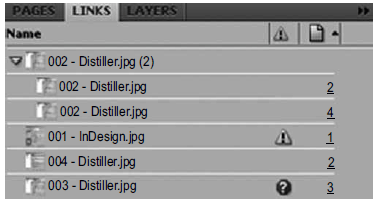
De acordo com a janela apresentada, é correto afirmar que a imagem
Provas

Assim como os outros softwares de editoração eletrônica, o InDesign possibilita a criação de páginas mestras. De acordo com esse recurso, assinale a alternativa incompatível com a sua característica.
Provas
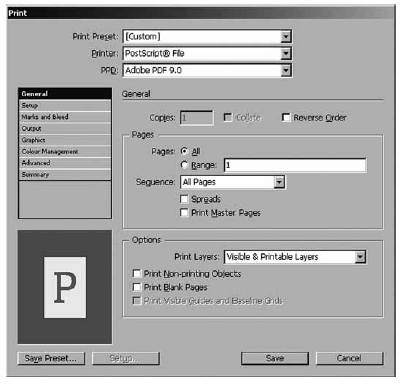
A tela representa o menu de impressão do InDesign.
Provas
Ao tratar imagens em RGB, é correto afirmar que o branco máximo e o preto máximo serão definidos pelas seguintes cores, respectivamente,
Provas
O texto a seguir, extraído e adaptado do Help do sistema operacional Windows 7, deve ser utilizado para responder às questões de números 58 a 60.Select multiple files or folders There are several ways to select multiple files or folders.
• (1) To select a consecutive group of files or folders, click the first item, press and hold down the Shift key, and then click the last item.
• (2) To select multiple files or folders that are near each other, drag the mouse pointer to create a selection around the outside of all the items that you want to include.
• (3) To select non-consecutive files or folders, press and hold down the Ctrl key, and then click each item that you want to select.
• (4) To select all of the files or folders in a window, on the toolbar, click Organize, and then click Select all. If you want to exclude one or more items from your selection, press and hold down the Ctrl key, and then click the items.
• (5) To select multiple files or folders by using check boxes: (a)
→ Click to open Folder Options. (b) Click the View tab. (c) Select the Use check boxes to select items check box, and then click OK. To clear a selection, click a blank area of the window. Tip: After selecting files or folders, you can perform many common tasks, such as copying, deleting, renaming, printing, and compressing. Simply right-click the selected items, and then click the appropriate choice.
No texto, a expressão press and hold down tem o significado de:
Provas
O texto a seguir, extraído e adaptado do Help do sistema operacional Windows 7, deve ser utilizado para responder às questões de números 58 a 60.Select multiple files or folders There are several ways to select multiple files or folders.
• (1) To select a consecutive group of files or folders, click the first item, press and hold down the Shift key, and then click the last item.
• (2) To select multiple files or folders that are near each other, drag the mouse pointer to create a selection around the outside of all the items that you want to include.
• (3) To select non-consecutive files or folders, press and hold down the Ctrl key, and then click each item that you want to select.
• (4) To select all of the files or folders in a window, on the toolbar, click Organize, and then click Select all. If you want to exclude one or more items from your selection, press and hold down the Ctrl key, and then click the items.
• (5) To select multiple files or folders by using check boxes: (a)
→ Click to open Folder Options. (b) Click the View tab. (c) Select the Use check boxes to select items check box, and then click OK. To clear a selection, click a blank area of the window. Tip: After selecting files or folders, you can perform many common tasks, such as copying, deleting, renaming, printing, and compressing. Simply right-click the selected items, and then click the appropriate choice.
No texto, uma palavra que tem o significado de “escolha” é:
Provas
O texto a seguir, extraído e adaptado do Help do sistema operacional Windows 7, deve ser utilizado para responder às questões de números 58 a 60.Select multiple files or folders There are several ways to select multiple files or folders.
• (1) To select a consecutive group of files or folders, click the first item, press and hold down the Shift key, and then click the last item.
• (2) To select multiple files or folders that are near each other, drag the mouse pointer to create a selection around the outside of all the items that you want to include.
• (3) To select non-consecutive files or folders, press and hold down the Ctrl key, and then click each item that you want to select.
• (4) To select all of the files or folders in a window, on the toolbar, click Organize, and then click Select all. If you want to exclude one or more items from your selection, press and hold down the Ctrl key, and then click the items.
• (5) To select multiple files or folders by using check boxes: (a)
→ Click to open Folder Options. (b) Click the View tab. (c) Select the Use check boxes to select items check box, and then click OK. To clear a selection, click a blank area of the window. Tip: After selecting files or folders, you can perform many common tasks, such as copying, deleting, renaming, printing, and compressing. Simply right-click the selected items, and then click the appropriate choice.
Com base no texto, dentre as operações mencionadas que podem ser realizadas com base nos arquivos ou pastas selecionadas, encontram-se:
Provas
Para criar uma nova instância de um clipe, utilizando Actionscript 3.0, deve-se utilizar o construtor
Provas
No ActionScript 2.0, o comando trace() tem a função de
Provas
Por meio da linguagem de programação ASP, para fazer com que um script tenha um tempo definido pelo programador a fim de parar sua execução (por exemplo, 200 segundos), deve-se usar a instrução:
Provas
Caderno Container